
A schematic maps how a circuit works, not how its parts are physically arranged. To learn how to read electrical schematics, follow the connections between symbols, identify components, and trace power and signal paths. Read the drawing as a system instead of trying to decode each symbol in isolation.
If diagrams feel difficult to interpret at first, that’s understandable: block diagrams and detailed schematics serve different purposes, and familiar components can be drawn in different ways. This guide explains how to distinguish diagram types, recognize common electrical symbols, and use component datasheets to clarify a symbol’s role and connections.
You’ll also learn how IEC and IEEE/NEMA conventions affect schematic symbols and layouts, helping you interpret drawings in different contexts. Each concept builds on the last, taking you from identifying what a diagram shows to understanding how its parts work together.
Key Takeaways
- Trace labels, nodes, power and ground to understand how a circuit connects, even when wires aren’t drawn between matching net names.
- Use block diagrams to grasp functional relationships, and detailed schematics to follow component-level connections and operation.
- Read symbols in context: designators, labels and circuit position help reveal what each component does.
- Consult a component’s datasheet to clarify its pin functions, operating characteristics and role in the circuit.
- Recognize that IEC and IEEE/NEMA conventions can represent components and layouts differently, so identify the drawing’s convention before interpreting it.
What is an Electrical Schematic?
An electrical schematic uses symbols, lines, nodes, and labels to show how circuit components connect and operate. Reading one means following those relationships from a power source, through control or load components, to the return path.
Symbols, Lines, Nodes, and Labels
A schematic symbol represents a component, while lines show electrical connections and labels identify signals or shared nets. These details matter because a drawing may show connected points without drawing a continuous wire between them. For example, matching labels such as GND, 5V, or 3.3V indicate shared connections. A junction node marks wires joined together; a crossing without a node may indicate separate paths.
Component designators commonly use one or two letters followed by a number, with the letters indicating the component type. Each component name should be unique, so a label such as R1 identifies a particular resistor rather than every resistor in the circuit. Labels such as IN, OUT, or GND can also indicate a signal’s purpose and help you follow its path.
Power and Control Circuit Sections
Industrial control and power diagrams distinguish the circuit that delivers energy to equipment from the circuit that controls its operation. In a motor-control drawing, the power section may show the supply path through switching devices to the motor, while the control section shows how a switch or signal energizes a contactor coil. Recognizing the two sections helps you separate the load’s current path from the commands that start or stop it.
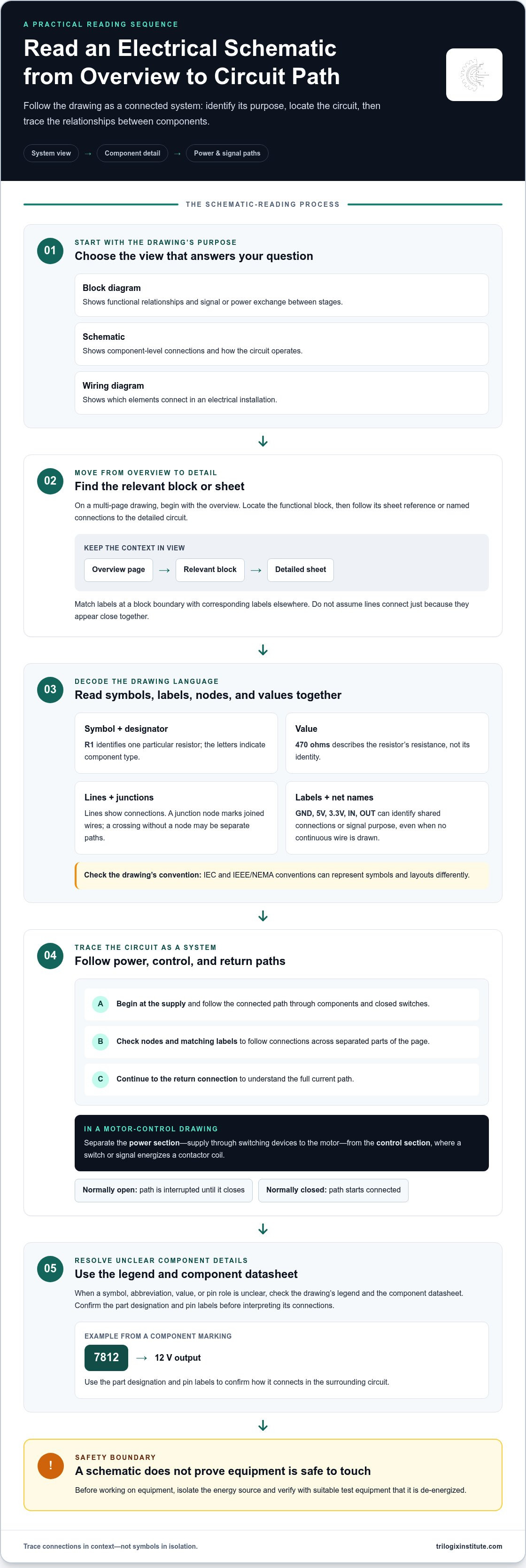
To trace current, start at the supply connection and follow the drawn path through connected components and closed switches to the return connection. Check junctions and labels as you go, since matching net names can link separated parts of a page. In a motor diagram, trace the power path to the motor, then follow the control path to see what operates its switching device.
Switches, Power, and Ground
Switch symbols show whether a path is open, closed, or controlled by a device; power-source symbols and labels identify where circuit energy enters. A normally open contact interrupts the path until it closes, while a normally closed contact starts with a connected path. Ground symbols and labels identify a reference or return connection, but their exact role depends on the circuit.
Before working on equipment using a schematic, isolate the energy source and verify with suitable test equipment that the equipment is de-energized. A drawing explains connections, but it does not prove the physical equipment is safe to touch.
Reference Designators and Component Values
Read a component’s reference designator beside its symbol, then use the printed value to understand its specified electrical role. For example, R1 identifies a resistor, while a nearby value of 470 ohms states its resistance. A designator identifies the component; the value describes a property. Keep those functions distinct when comparing the drawing with a component list or datasheet.
When a value or symbol is abbreviated, use the drawing’s legend and the component datasheet to interpret it. For example, a regulator marked 7812 has a 12 V output. Confirm the part designation and its pin labels before interpreting how it connects to the surrounding circuit.
Block diagrams versus schematic diagrams
Choose the diagram that answers your question: block diagrams explain functional relationships, while schematics show circuit operation and component connections. Recognizing the difference helps you move from an overview to the details needed to understand a system.
Identifying Functional Blocks
A functional block represents a stage or subsystem and shows how it exchanges signals or power with other blocks. Identify each block’s input, output, and purpose before tracing connections. For example, an amplifier block receives an input signal and passes an amplified signal onward. This view shows the system’s sequence without requiring component-level details.
Arrows and labels clarify direction and function. In a control system, a sensor block might send a measured signal to a controller, which then signals an output device. Follow the connections from input to output to understand how the system is organized. A block diagram simplifies an operation when detailed construction information isn’t needed.
A wiring diagram shows connections between elements in an electrical installation, while a schematic explains circuit operation through symbols and functional relationships. Use the wiring diagram to see which elements connect and the schematic to trace how the circuit operates.
Pages and Hierarchical Blocks
A multi-page schematic divides a larger design into linked sheets, while a hierarchical block represents a detailed circuit on a separate sheet. Start with the overview page, find the relevant block, then follow its sheet reference or named connections to the detailed drawing. This keeps the system-level context in view while you examine one section at a time.
On the detailed page, match connection labels at the block boundary to corresponding labels elsewhere in the drawing. Then trace the relevant signal or power path through that section. For example, a controller output on one sheet may connect by label to a relay circuit on another. Don’t assume lines connect simply because they appear close together.
Choose the diagram type that fits the task. A one-line diagram gives an overview of low- and/or high-voltage distribution, while a detailed schematic helps trace component-level operation. A logic diagram can support troubleshooting by showing possible faults and the actions or directives to follow during a sequence.
For a practical reading approach, move from the overview to the relevant functional block, then follow its connections into the detailed schematic. Readers building foundational engineering knowledge can explore electrical engineering course options alongside these diagram-reading concepts.
Electrical symbols and representation standards
Standardized electrical symbols let engineers represent components and connections consistently across a drawing. Recognizing a symbol’s function helps you interpret the circuit rather than relying on the equipment’s physical appearance.
Common Electrical Symbols
A schematic symbol is a standard graphic that represents an electrical component or function. Its shape offers a quick clue, while nearby labels and connections clarify its role in the circuit.
For example, a resistor symbol indicates a component that limits current, while a capacitor symbol represents one that stores electrical charge. A diode symbol indicates the direction of conventional current, and a switch symbol shows a contact that can open or close a path. A battery symbol marks a source; a ground symbol identifies a reference or return connection.
Operational amplifiers use a triangle, with input terminals on one side and an output on the other. A typical operational amplifier schematic symbol has 5 terminals. The two input terminals represent the inverting and non-inverting inputs, while the output terminal carries the amplifier’s signal. The remaining terminals connect to its supply rails. This arrangement helps distinguish signal paths from power connections.
Symbol Representation Standards
Representation standards define shared symbols for electrical diagrams, so readers can recognize components across drawings. IEC 60617 is a standard for symbols used in electrical schematic diagrams. Consistent representation supports clear communication when a schematic describes an existing or planned installation.
The same component can appear differently under different drafting conventions. Before interpreting unfamiliar graphics, identify the drawing’s standard or legend, then compare each symbol with its label and surrounding connections. This helps prevent misinterpretation when reviewing designs that use different conventions.
Use the drawing’s symbol key as a reference. Match the symbol to its name, then trace its terminals to understand what the component does in that circuit. For example, a relay is easier to understand when you identify its coil and contact symbols together. The coil serves the control function; its contacts affect another circuit path.
Apply the same method to unfamiliar symbols: locate the legend, read the component label, inspect terminal markings, and follow connected lines. A standard symbol is a starting point, not a complete operating specification. The surrounding circuit shows whether a component controls a signal, supplies power, or forms part of a load connection.
Symbols communicate best as a system. An amplifier triangle, a supply connection, and a feedback path together explain more than any one symbol alone. Read the graphic, label, and connections as a unit to understand the intended function without mistaking the schematic for a physical layout.
Checking component datasheets
A datasheet links a schematic symbol to a component’s actual characteristics, pin functions, and operating limits. Use it when a part number, terminal label, or drawing symbol leaves an important detail unclear. For example, a schematic may identify a voltage regulator, while its datasheet explains the pinout and output. This cross-check helps clarify how the selected component fits into the circuit.
Match the Part Number and Package
Begin by matching the complete part number printed beside the symbol with the datasheet’s device name. Similar part numbers can refer to components with different functions, pin arrangements, or packages. A 7812 positive voltage regulator has a 12 V output. Its datasheet helps connect that identifier to the correct terminals and electrical role in the schematic.
Next, compare the datasheet’s pinout drawing with the symbol’s terminal labels and the schematic connections. Check the package view carefully: a pin diagram may show a top view or another specified orientation. This matters when relating a terminal on paper to the component’s physical leads. Follow the stated package and orientation rather than assuming the drawing matches the component’s installed position.
Read the Ratings in Context
Datasheet ratings describe a component’s electrical limits and intended operating conditions. Compare the values relevant to the circuit with the part’s stated characteristics, such as supply requirements, output behavior, or current handling. Don’t treat an absolute maximum rating as a normal operating target: it marks a limit, not necessarily a suitable design condition.
- Pin functions: Match each named terminal to the schematic’s connection.
- Electrical characteristics: Compare the listed input, output, and load information with the circuit’s intended role.
- Operating limits: Distinguish recommended conditions from maximum ratings.
- Package details: Use the package drawing and orientation to identify terminals accurately.
Graphs and tables add context to summary values. For a regulator, check how its output behavior relates to the conditions in the datasheet, then compare those conditions with the schematic. For a transistor, examine the terminal names and characteristic information before deciding how its connections serve the circuit. The symbol alone does not communicate these specifications.
Use a consistent cross-reference: identify the schematic designator, read the associated part number, find the matching datasheet, then compare its pin functions with the drawn wiring. If the drawing marks Pin 1 or a cathode, use that polarity or orientation marking when matching the physical component. This prevents confusing a correct part with an incorrectly interpreted connection.
Datasheets also clarify abbreviations and device variants that a schematic cannot fully explain. Keep the drawing and datasheet side by side, and check each relevant connection against the component’s function. This turns a schematic from a symbolic representation into a more precise guide to the selected part and its place in the circuit.
IEC and IEEE/NEMA schematic conventions
IEC and IEEE/NEMA conventions influence the appearance of symbols, labels, and drawing layouts. The practical rule is simple: identify the convention used on each drawing before interpreting unfamiliar marks. A symbol’s function and connections matter more than whether its graphic matches a familiar example.
IEC 60617 covers symbols for electrical schematic diagrams. IEEE and NEMA conventions are also encountered in engineering drawings, particularly where North American drafting practices are used. These labels don’t mean every drawing follows one identical visual template. Project requirements, drawing type, and drafting choices can affect how information is presented.
Start with the title block, legend, and notes. They may identify the applicable standard, explain abbreviations, or define project-specific symbols. Then inspect component designators, terminal markings, and connection labels. If a switch symbol looks unfamiliar, for instance, use its label and terminal connections to determine its role rather than relying on its shape.
A useful comparison separates what stays consistent from what may change:
- Function: Identify whether the mark represents a switch, relay, motor, or other component.
- Connections: Follow terminals and labels to establish which circuit paths meet.
- Identification: Read designators and component names to distinguish devices.
- Presentation: Note symbol shapes, arrangement, and labeling conventions shown in the legend.
This comparison helps prevent a common reading error: assuming a symbol means something different just because its graphic has changed. Compare the component’s stated function and terminal connections across the drawings. If the same relay function appears in two styles, its label and circuit role help establish the correspondence.
Layouts can differ too. One drawing may separate functions into clearly marked sections; another may arrange related components differently. Don’t infer an electrical connection from visual proximity. Follow drawn lines, matching net labels, and terminal references. If the schematic includes a legend or cross-reference, use it before tracing the circuit further.
For equipment used in the UAE, use the drawing supplied for that specific installation as your working reference. Read its stated convention and project notes, then interpret symbols in that context. A convention guides how information is represented, but it doesn’t replace the drawing’s component identifiers or connection details.
The key is to establish the convention, decode the legend, then trace function and connections. This method supports accurate interpretation across IEC and IEEE/NEMA drawings without assuming their symbols or layouts are interchangeable.
Trilogix Institute: TTI Dubai Foundation Electrical Engineering
Trilogix Institute offers TTI Dubai Foundation Electrical Engineering for learners seeking a structured, practical foundation in electrical engineering. After learning to interpret symbols, trace circuit paths, and compare schematic conventions, this course is a relevant next step toward broader technical understanding.
The course may suit learners who want to strengthen their foundations before applying diagram-reading concepts in technical settings. For a focus on industrial motor control, TITP Beginner Essential Industrial Motor Control is another relevant option. Choose based on the area of electrical work you want to explore, and treat schematic study as a complement to supervised practical learning.
Contact Trilogix Institute to discuss which course aligns with your learning goals.
Build Confidence Through Practical Learning
Understanding how to read electrical schematics is a useful starting point; applying that knowledge to unfamiliar drawings is the next step. Build the habit of checking each diagram’s purpose, tracing its functional relationships, and using component documentation to resolve details. With practice, you can approach new drawings systematically and identify where you need to deepen your understanding.
For a structured foundation in electrical engineering, Trilogix Institute offers TTI Dubai Foundation Electrical Engineering. It’s a relevant next step if you want to build your technical grounding beyond independent diagram study. Choose a learning path that fits the electrical work and skills you want to pursue, then apply your schematic-reading practice to that broader learning.
Contact Trilogix Institute to learn more about its electrical engineering course. Take the next step at your pace, and keep building practical understanding one drawing at a time.
Frequently Asked Questions
What Will You Learn?
You’ll learn how to read electrical schematics by identifying what each drawing is designed to show and following its logic. The guide covers differences between block diagrams and detailed schematics, symbol interpretation, datasheet use, and IEC and IEEE/NEMA conventions. It also offers a method for approaching unfamiliar drawings: establish the context, examine relevant labels, then connect each detail to the system’s intended operation.
What are the basic symbols used in electrical schematics?
Basic symbols represent components such as resistors, capacitors, diodes, switches, relays, and transformers. Their meaning depends on both the graphic and its role in the circuit. For example, a fuse symbol in a supply path indicates a protective component, while a lamp symbol at a circuit output can represent an indicator or load. Check the drawing’s legend to resolve variations before interpreting an unfamiliar mark.
How do you identify wires, connections, and junctions on a schematic?
Follow each line between component terminals, using junction marks and labels to distinguish connected paths. A marked branch point indicates a shared connection; a crossing without a junction mark may show lines passing without joining. If a line ends at a named connection, look for the same label elsewhere in the drawing. This is especially useful when tracing a signal across a crowded page.
How do you interpret schematic symbols for switches, relays, and transformers?
Read a switch by checking its drawn contact state and operating label, then determine what action changes that state. For a relay, locate the coil and its associated contacts; the coil’s control path explains what operates them. A transformer symbol shows coupled windings, so trace each winding’s connections separately to see where the input and output circuits sit. Terminal labels and the legend help distinguish specific configurations.
How do you read power, ground, and common connections on schematics?
Read power labels as supply connections, then identify the reference or return labels used in that drawing. “Common” can describe a shared reference or connection point, but it doesn’t automatically mean protective earth. For example, a low-voltage control circuit may use a common reference distinct from the equipment’s protective grounding connection. Follow the labels and drawing notes to understand each connection’s function.
What do line types, labels, and cross-references mean in electrical schematics?
Line styles can distinguish electrical connections from mechanical links, signal paths, or other drawing details, so consult the legend before assigning meaning. Labels identify named connections or components, while cross-references point to related symbols or locations elsewhere in the drawing. For instance, a contact reference beside a relay coil can help you locate its associated contact. Use these references to follow a function across sheets without assuming proximity means connection.


