

Your AutoCAD certificate opens a door; practical work helps employers see what you can contribute. If you’re asking what to do after AutoCAD certification, start by turning what you’ve learned into clear evidence of your drafting ability rather than rushing into another course.
A certificate can show that you’ve studied the software, but it may not show how you approach a drawing, use 2D and 3D tools, or respond to feedback. A focused portfolio and clear career direction make your skills easier to assess.
This guide offers a practical plan for choosing your next move. Learn how to select portfolio projects, present your skills in applications, and decide whether to pursue a role, build more work samples, or address a specific skill gap with further training. You don’t need to do everything at once. Choose the next step that best fits your current ability and the work you want to do.
Key Takeaways
- Decide what to do after AutoCAD certification by matching your next step to your current skills and target drafting role.
- Build a focused portfolio with original or permission-cleared work that makes your applied drafting skills easier to assess.
- Compare applying for entry-level roles, developing a specialization, and further training before committing your time.
- Use a flexible four-week action plan to create one practical career asset each week.
- Choose additional AutoCAD training when you’ve identified a specific skill gap, and compare structured instruction with independent practice.
Post-AutoCAD Certification: Define Your Next Career Step
Finishing an AutoCAD certification can feel like a milestone, followed by a practical question: what comes next? The credential indicates that you’ve studied the software and met a learning benchmark. It doesn’t automatically show how you’ll interpret a project brief, produce a clear drawing set, or organize files for someone else to use. Employers may consider certification alongside work samples, experience, and role-specific skills, with expectations varying by position.
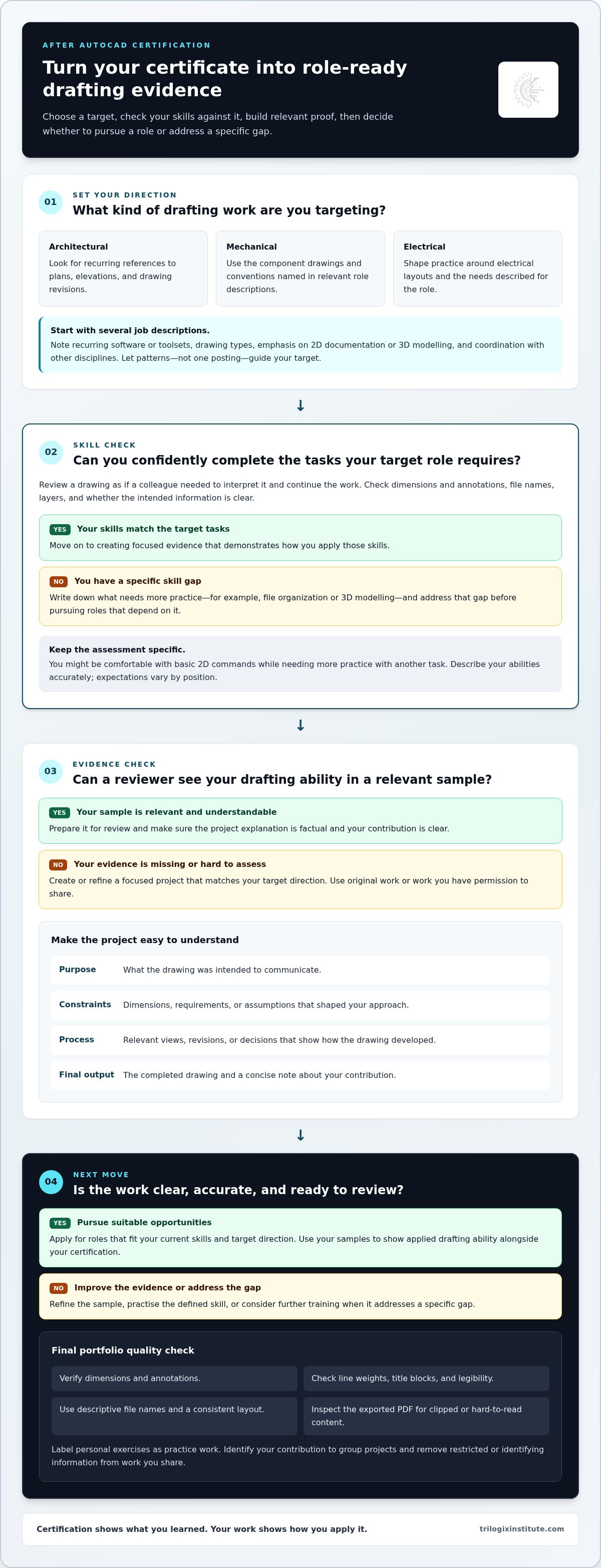
Certification shows what you’ve learned; demonstrated drafting capability shows how you apply it. To decide what to do after AutoCAD certification, use a straightforward sequence: choose a target, assess your skills against it, produce relevant evidence, then pursue opportunities that fit.
- Choose a target: Name the drafting direction you want to explore.
- Assess your skills: Compare your current ability with the tasks that direction requires.
- Produce evidence: Create a focused example that demonstrates your process and result.
- Pursue opportunities: Apply for suitable roles or address a defined skill gap first.
Identify the drafting work you want to pursue
Architectural, mechanical, and electrical drafting use different drawing conventions and serve different project needs. Start by reviewing descriptions of roles that interest you. Note recurring requirements: which software or toolsets appear, what kinds of drawings are mentioned, and whether the work emphasizes 2D documentation, 3D modelling, or coordination with other disciplines. AutoCAD supports work across multiple industries; the AutoCAD Wikipedia page offers background on its history and applications. Use job descriptions to identify what a particular role requires.
Look for patterns across several postings instead of treating one description as a universal checklist. If architectural roles repeatedly mention plans, elevations, and drawing revisions, use those clues to shape a relevant practice project. A mechanical drafting role may call for different component drawings and conventions. Let your target guide the examples you build and the skills you develop, rather than practising without a clear purpose.
Assess what your certification demonstrates
A certification may reflect knowledge of commands, settings, and workflows, but completing a drafting task also requires sound decisions. Review a sample drawing as if a colleague had to interpret it and continue the work. Are dimensions and annotations accurate? Are layers, file names, and drawing elements organized consistently? Can someone understand the intended information without extra explanation?
Write down what you can do confidently and where you need more practice. You might, for example, be comfortable with basic 2D commands but need to strengthen file organization or 3D modelling. This inventory gives your next step a clear purpose and helps you describe your abilities accurately in applications. Avoid assuming that every employer uses the same criteria or overstating your experience.
Build an AutoCAD Portfolio That Shows Applied Drafting Skills
A portfolio gives employers something concrete to review beyond a certificate or a list of software commands. Keep it focused: a few well-chosen projects, explained clearly, can show how you interpret requirements, make drawing decisions, and prepare work for review. A collection of unrelated or unexplained files makes those skills harder to assess.
A useful drafting portfolio makes your decisions, accuracy, and finished drawings easy to understand. As you decide what to do after AutoCAD certification, choose examples that fit the role you’re targeting instead of trying to demonstrate every feature in the software.
Choose projects that demonstrate more than software commands
Select original practice work or projects you have permission to share. Match each sample to your intended direction, such as an architectural plan, a mechanical component drawing, or an electrical layout. Show precise geometry, readable annotations, and consistent layer use. Each drawing should communicate its purpose, not just demonstrate that you can create lines and shapes.
Add a short explanation to each project so reviewers can understand the work without guessing. Include:
- Purpose: What the drawing was intended to communicate.
- Constraints: The dimensions, requirements, or assumptions that shaped your approach.
- Process: Relevant views, revisions, or key decisions that show how the drawing developed.
- Final output: The completed drawing and a concise note about your contribution.
Keep each explanation factual. Label a personal exercise as practice work rather than presenting it as commissioned work. For group projects, identify your contribution. Remove client details, restricted information, or identifying data from any work you’re authorized to show. For broader career context, the Bureau of Labor Statistics overview of drafting occupations outlines the work; use it as a reference alongside role requirements.
Present files and drawings professionally
Make your samples easy to navigate. Use descriptive file names, such as “Mechanical-Bracket-Detail.pdf,” and apply a consistent layout to project notes and drawing sheets. Export drawings as PDFs for quick review, and retain editable files when appropriate to share. Before sending a sample, inspect it at normal viewing size and check that no important content is clipped or difficult to read.
Run a final quality check. Verify dimensions and annotations, line weights, title blocks, and legibility. Open the exported file to catch display or plotting issues rather than assuming the export is correct. A tidy presentation signals care and prevents avoidable formatting problems from distracting from the drafting itself.
When portfolio work reveals a specific area to strengthen, Trilogix Institute’s instructor-led Advanced AutoCAD 2D & 3D course supports practical skill development. Apply what you learn to a focused project, then use the resulting drawings to demonstrate your skills.
Compare Your Next Options After AutoCAD Certification
There’s no single correct answer to what to do after AutoCAD certification. Your next move depends on the work you’re targeting, the quality of your current examples, and whether a specific skill gap is holding you back. You can apply for suitable roles while continuing to practise; these routes aren’t mutually exclusive.
Use this comparison to choose a practical starting point. “Effort” means the preparation involved, not a prediction of how quickly a route will lead to a job.
When to start applying for drafting opportunities
Consider applying when you can describe how you approach a drawing task and show sample work relevant to the role. You don’t need to claim expertise in every listed tool or task. Focus on the requirements you can meet and be clear about your experience level. Entry-level roles are one possible way to build workplace experience, not a guaranteed outcome.
Tailor each application to the work described. If a posting emphasizes technical plans, highlight samples that demonstrate clear annotations and drawing organization. If it focuses on revisions, explain how you incorporated changes into a sample. This makes your application specific without overstating your capability.
When specialization or further learning makes sense
Specialize when the same discipline-specific requirements appear across the roles you want. For example, repeated references to 3D modelling may point to a useful area to practise. Further study may help when a defined gap, such as working through a complex workflow or producing a more complete drawing, limits your quality or confidence. Trilogix Institute’s Advanced AutoCAD 2D & 3D training provides instructor-led, practical learning for those strengthening applied skills.
Set a purpose before committing to a course: name the skill you want to improve and the work sample you’ll create to demonstrate it. Then combine focused practice with applications where you’re ready. This keeps your career action moving while you continue to develop.
Create a 30-Day Action Plan After AutoCAD Certification
A short plan can turn uncertainty about what to do after AutoCAD certification into a sequence of manageable tasks. Treat the four-week schedule below as a flexible example, not a deadline or a promise of employment. Adjust the pace around your commitments and focus on one practical output each week.
Keep a simple progress log. Record completed work, feedback you receive, and skill gaps you notice. This helps you distinguish what’s ready to show from what needs more practice.
Weeks one and two: set direction and complete a sample
Week one output: a target-role requirements list. Choose a drafting area, such as architectural, mechanical, or electrical, then review relevant role descriptions. Note recurring drawing tasks, software requirements, and skills. Look for patterns across postings rather than treating one description as a universal standard. Use those requirements to select a practice project that reflects the work you want to pursue.
Week two output: one completed, role-relevant drawing sample. Build an original project that lets you apply the requirements you identified. Keep the scope manageable enough to complete and review. Check dimensions, annotations, layer organization, and whether the drawing communicates its purpose clearly. Note any revisions and why you made them. Aim for a finished example you can explain, not an elaborate project that remains incomplete.
Weeks three and four: present evidence and take action
Week three output: a concise project description and updated application materials. Write a short explanation of the sample’s purpose, your process, and the skills it demonstrates. Update your CV or relevant application profile to reflect those strengths accurately. Save the drawing in a review-ready format, and make sure the description and file give a consistent account of your contribution.
Week four output: a record of career action and a defined learning goal. Apply to roles that match your current skills, or have a knowledgeable person review your sample and provide feedback. Track applications or feedback without treating responses as a measure of your overall potential. Identify recurring comments or technical difficulties, then choose one practice goal based on what you observed.
At the end of the month, assess progress against your outputs, not an assumed hiring result. You may have a stronger sample, a clearer target, and a more accurate view of your next skill gap. If your review points to a need for structured AutoCAD practice, Trilogix Institute’s instructor-led Advanced AutoCAD 2D & 3D course offers a practical learning option.
When Advanced AutoCAD Training Is the Right Next Step
More training isn’t automatically the answer after certification. It’s useful when you can name a specific skill gap and explain how improving it would strengthen your work. If you’re deciding what to do after AutoCAD certification, review a drawing you’ve completed, compare it with the requirements of your target roles, and identify where you need more practice.
The gap might involve accuracy, efficient use of 2D tools, 3D modelling, or managing a drawing workflow from setup to final output. Be specific. “I need to improve my 3D modelling” gives you a clearer outcome to practise and evaluate than “I should learn more AutoCAD.”
Match training to the skill you need to strengthen
Before choosing a learning route, compare its focus with your intended work and current ability. If you can already produce basic 2D drawings but struggle to build or communicate 3D forms, prioritize learning that addresses that gap. If your main issue is consistency, focus on practice that reinforces accuracy and workflow rather than collecting another credential without a defined purpose.
Independent practice can work well when you know what to practise, can find suitable exercises, and can review your own results. It lets you set the pace and repeat tasks as needed. Instructor-led learning provides structure for practical skill development and may suit you if you benefit from guidance while working through unfamiliar techniques. Neither approach is universally better; choose based on the gap and how you learn most effectively.
Use structured practice to reinforce workplace readiness
Trilogix Institute offers an instructor-led Advanced AutoCAD 2D & 3D course for practical skill acquisition. It can be a useful next step when your review shows that targeted AutoCAD practice could help you produce clearer, more complete drawings. Before starting further learning, define what you want to improve and what kind of drawing or workflow you want to be better prepared to complete.
Use that outcome to judge whether training is relevant: does its focus align with the role requirements you’ve found, and does it address a genuine limitation in your current work? Training should strengthen your ability to apply skills, not replace the process of building and presenting evidence of what you can do.
If structured practice fits your goal, explore the AutoCAD training course. If independent work is enough for now, set a focused practice task and review the result against the same criteria: accuracy, clarity, and suitability for the drafting work you want to pursue.
Put Your Next AutoCAD Step Into Motion
The most useful answer to what to do after AutoCAD certification is a step you can act on now. Choose one move that brings you closer to the drafting work you want, then focus on it: strengthen a skill, refine a project, or pursue a suitable opportunity. Consistent action can turn a credential into clearer direction and stronger professional evidence.
If a defined skill gap calls for structured practice, Trilogix Institute’s instructor-led Advanced AutoCAD 2D & 3D course supports practical skill development. Choose training that matches the skill you want to build, then apply it to a project that demonstrates your progress.
Explore Trilogix Institute's technical courses and take your next step with purpose. Your certification is a starting point; the skills you build from here can help you move forward with confidence.
Frequently Asked Questions
Is AutoCAD certification enough to get a drafting job?
No. AutoCAD certification can show that you’ve learned the software, but it doesn’t guarantee employment. Employers may also consider drawing quality, communication, relevant experience, and discipline-specific skills. Pair the credential with evidence such as a clearly labelled practice drawing, then tailor each application to the role. For example, if a posting emphasizes revision work, explain how you handle drawing changes. Expectations vary, so use each job description as your guide.
What jobs can I apply for after AutoCAD certification?
Possible roles depend on your prior experience, work samples, and industry focus. Entry-level CAD drafter or drafting technician positions may suit candidates whose skills match the listed tasks, but titles and requirements differ between employers and disciplines. Search by drawing type as well as job title. Compare recurring tasks across postings, then apply where you can accurately demonstrate the required skills instead of assuming certification qualifies you for every CAD position.
Can I get an AutoCAD job without experience?
Some entry-level opportunities may consider applicants with limited professional experience, but requirements vary. Personal projects can help you show how you approach drafting tasks. Label them clearly as practice work, explain your design decisions, and identify transferable skills such as attention to detail or working through feedback. Don’t describe a self-directed project as paid client work. A strong example can support an application, but it can’t guarantee an interview or job offer.
Should I build a portfolio after AutoCAD certification?
Yes, a portfolio can help reviewers assess your drafting ability, particularly if you haven’t yet completed professional projects. Prioritize a few samples that align with the roles you’re pursuing rather than adding every drawing you’ve made. For each one, briefly state its purpose, your contribution, and the final deliverable. Use original work or obtain permission before sharing someone else’s project, and remove confidential details you aren’t authorized to disclose.
Does an AutoCAD certification expire?
It depends on the credential and its issuer. Autodesk Certified Associate and Autodesk Certified Professional certifications are valid for three years, while Autodesk Certified Expert certification is valid for two years, according to current Autodesk certification terms. Other credentials may use different rules. Check your certificate or issuer’s documentation for its validity date, renewal conditions, and any version requirements. Even if it remains valid, recent work can help demonstrate that your practical skills are current.
What should I put on my resume after AutoCAD certification?
Name the credential exactly as issued, include the issuer, and add the completion date if relevant. List only AutoCAD capabilities you can demonstrate, then connect them to a task or project, such as preparing annotated plans or organizing drawing layers. Tailor the wording to each vacancy. Place coursework or personal projects in a separate section from employment history so recruiters can distinguish applied practice from professional experience.


