

While many drafters rely on years of trial and error, the reality of the 2026 job market is that 70% of industrial firms now prioritize validated expertise over tenure alone. You've likely felt the pressure to prove your speed and accuracy, yet the prospect of a US$200 proctored exam often feels like a high-stakes gamble when you're aware of your own self-taught gaps. It's a common frustration to realize that your personal workflow doesn't always align with the rigid requirements of professional standards.
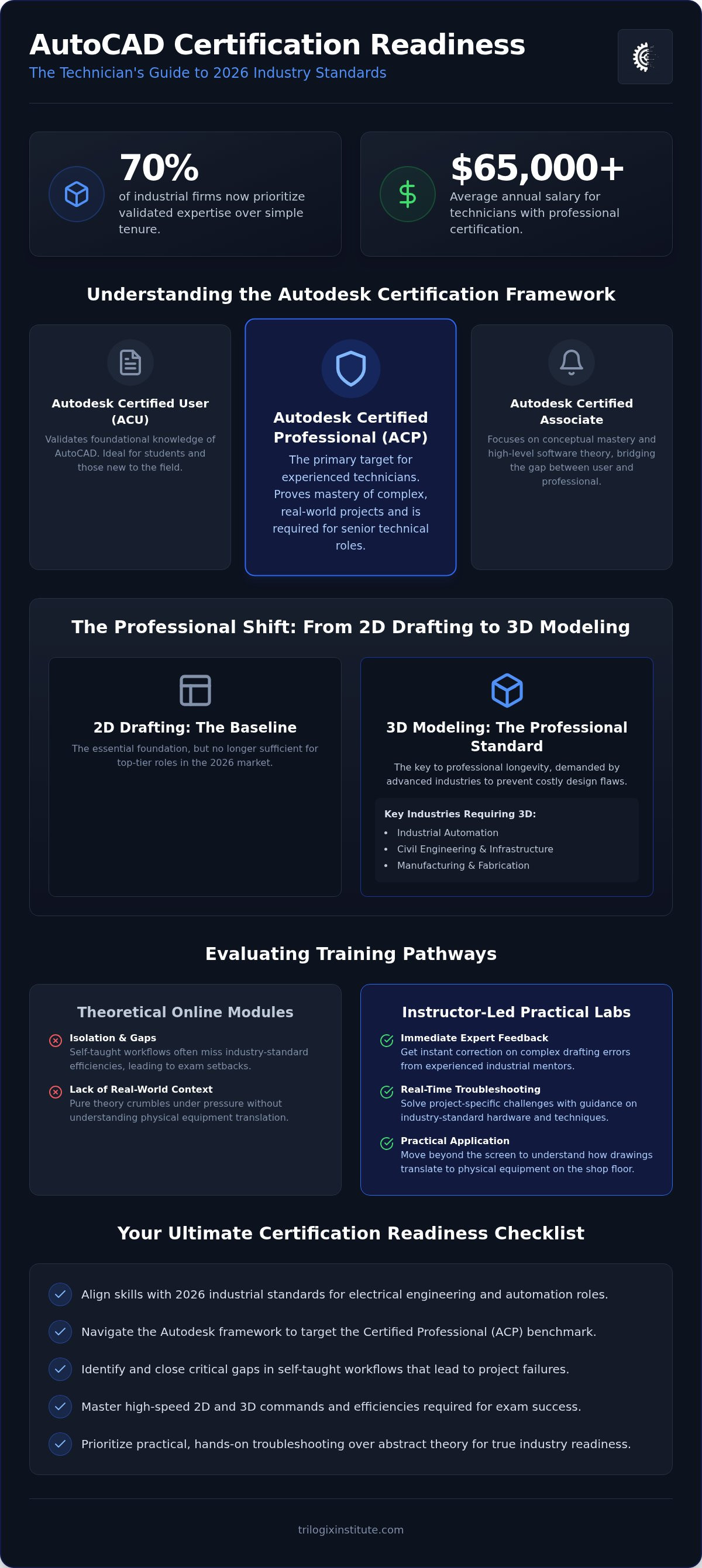
By following this readiness checklist, you'll master the technical efficiencies and advanced 2D and 3D commands necessary to secure a professional AutoCAD certification for technicians. We'll bridge the gap between your current proficiency and the mastery required to command salaries that now average over $65,000 for certified experts. This guide breaks down the essential updates in AutoCAD 2026.1.1, clarifies the distinction between User and Professional levels, and provides a methodical path to ensuring your skills are industry-ready and globally recognized. We'll move from broad technical requirements into the granular details of exam preparation to ensure you're fully prepared for the 2026 standards.
Key Takeaways
- Align your skills with 2026 industrial standards that increasingly require validated certification for roles in electrical engineering and automation.
- Navigate the Autodesk framework to distinguish between entry-level user status and the Certified Professional benchmark required for senior technical roles.
- Identify the critical gaps in self-taught workflows that often lead to project failures and expensive exam setbacks.
- Implement a structured readiness checklist to master the high-speed 2D and 3D efficiencies required for successful AutoCAD certification for technicians.
- Transition from foundational drafting to advanced industrial application through instructor-led training that prioritizes practical troubleshooting over theory.
The Growing Demand for Certified AutoCAD Technicians in 2026
Industrial standards are evolving at a rapid pace. By 2026, many national regulatory bodies have moved toward requiring mandatory certification for technical roles. This isn't just a trend; it's a structural change in how industrial engineering firms hire. Employers no longer want to gamble on self-taught skills. They need an AutoCAD certification for technicians to verify that a candidate can handle complex workflows without constant supervision. Understanding what is AutoCAD in a professional context means recognizing it as more than a drawing tool; it's a precision instrument for global infrastructure.
In fields like electrical engineering and industrial motor control, AutoCAD is the backbone of the design process. It's used to map out intricate wiring diagrams and motor layouts that must adhere to strict safety codes. When you compare a vocational training vs university degree, the targeted nature of certification often provides a faster, more cost-effective entry into these high-demand sectors. You don't need four years of theory to excel in technical drafting; you need mastery of the specific tools used on the shop floor.
The distinction between a "drafter" and a "certified technician" is significant. A drafter might simply replicate drawings, but a certified technician understands the underlying engineering logic. This shift is a primary salary driver in 2026. Certified professionals often command higher pay because they reduce the risk of costly drafting errors in the field. An AutoCAD certification for technicians acts as a seal of approval for your technical workflow. It proves you can navigate the software's deep feature set, from layer management to Xrefs, with professional-level speed.
Bridging the Gap Between Theory and Practical Application
Purely theoretical knowledge often crumbles in a high-pressure industrial environment. If you don't understand how a drawing translates to a physical piece of equipment, accuracy suffers. This is why equipment-based training is essential. It moves beyond the screen and into real-world application. Specific AutoCAD classes for professionals UAE provide this localized context, ensuring your technical skills align with the specific requirements of national infrastructure projects. Instructor-led sessions offer benefits that self-paced modules can't match:
- Immediate feedback on complex drafting errors
- Exposure to industry-standard hardware and plotting techniques
- Direct mentorship from experienced industrial experts
- Real-time troubleshooting for project-specific challenges
The Shift Toward 3D Modeling in Industrial Engineering
In 2026, 2D drafting is merely the baseline requirement. The professional standard has moved decisively toward 3D modeling. Industries like civil engineering, manufacturing, and industrial automation lead this demand. They require technicians who can visualize complex components in a three-dimensional space to prevent collisions and design flaws. Mastering Advanced 3D modeling for engineers is no longer optional for those seeking top-tier roles; it's the key to professional longevity. 3D modeling allows for better collaboration across departments, as fabrication teams can identify issues before a single part is manufactured. This foresight is exactly why recruiters prioritize certified experts.
Understanding the Autodesk Certification Framework for Professionals
Choosing the right level of certification is critical for career progression. The Autodesk framework is divided into tiers that reflect different stages of expertise. The Autodesk Certified User (ACU) validates foundational knowledge, typically suited for those just entering the field. The Certified Associate focuses on conceptual mastery and high-level software theory. However, for the experienced technician, the "Certified Professional" (ACP) level is the primary target. This credential proves you can handle complex, real-world projects with minimal supervision. The Autodesk Certified Professional badge stands as the definitive industry benchmark for technical expertise in 2026.
You shouldn't attempt the ACP exam without significant hands-on experience. Autodesk recommends between 400 and 1,200 hours of real-world software usage before sitting for the test. This ensures you've encountered and solved the common drafting bottlenecks that occur in industrial environments. Securing an AutoCAD certification for technicians requires more than just knowing where the commands are; it requires an optimized workflow that prioritizes speed and precision.
AutoCAD Certified Professional: What Technicians Need to Know
The ACP exam tests your ability to use advanced software tools that drive project efficiency. You'll be evaluated on your mastery of advanced layer management and the use of External References (Xrefs) to manage large, collaborative files. Technicians must also demonstrate proficiency with the Design Center and Tool Palettes. These tools allow you to drag and drop standardized content across multiple drawings, significantly reducing repetitive drafting tasks. The exam itself is a rigorous 120-minute session consisting of 45 to 60 questions. You must navigate the interface quickly to achieve a passing score, which typically hovers around 70 percent to 80 percent depending on the specific version.
Specialized Certifications for Electrical and Industrial Roles
General AutoCAD proficiency is often just the beginning. Many 2026 technicians are pursuing specialized tracks, such as AutoCAD Electrical, which includes dedicated tools for schematic design and panel layouts. This differs from the general track by focusing on automated wire numbering and component tagging. Integrating these skills with electrical engineering courses in Dubai creates a dual-threat resume that is highly attractive to industrial automation firms. As industries become more integrated, the demand for multi-disciplinary experts continues to rise. If you're ready to align your skills with these benchmarks, explore our advanced technical training programs to begin your preparation.
Evaluating Training Pathways: Practical Labs vs. Theoretical Online Modules
The self-taught myth suggests that technical mastery is just a few video tutorials away. While free resources offer a starting point, they often fail to instill the rigorous drafting standards required by national industrial firms. Missing these foundational protocols leads to project failure during the hand-off phase between departments. An AutoCAD certification for technicians requires a level of precision that passive learning simply cannot provide. When you bypass professional feedback, you risk cementing inefficient workflows that proctored exams will immediately flag.
Retention rates tell a clear story. Passive video watching typically results in low skill transfer because the student isn't forced to troubleshoot real-time errors. In contrast, hands-on lab environments engage the "muscle memory" required for high-speed drafting. Technicians working in industrial automation need to know how the software interacts with hardware specifications. This connection is lost when learning is confined to a browser window without the context of a physical workstation.
The Instructor-Led Advantage for Career Change
Professional mentors play a vital role in helping students avoid common "bad habits." For instance, self-taught users often over-rely on the "Explode" command or ignore proper layer nesting, which creates chaos in collaborative files. Structured feedback is especially critical when mastering complex 3D modeling. An instructor can spot a geometric constraint error in seconds that might take a solo learner hours to resolve. This efficiency is why national employers prioritize "ready-to-work" talent from instructor-led programs. They don't want to spend months retraining a new hire on basic industry standards; they want someone who has already been vetted by an expert.
Equipment-Based Training: Simulating the Industrial Workplace
Industrial environments use high-performance workstations that differ significantly from a standard home laptop. Training on this equipment prepares you for the high-intensity 3D rendering tasks that are now professional standards. Using real-world engineering specs during your labs ensures that the drawings you produce aren't just aesthetically correct; they're functionally accurate. This level of preparation is what makes the difference during the 120-minute Certified Professional exam. You can explore our Trilogix courses page to see how our practical curriculum structures simulate these industrial environments. By training in a lab that mirrors your future workplace, you eliminate the "interface shock" that often occurs during career transitions.
The Ultimate AutoCAD Certification Readiness Checklist for Technicians
Achieving an AutoCAD certification for technicians in 2026 demands a shift from simply knowing commands to optimizing entire technical workflows. Success on the proctored exam depends on your ability to adhere to international drafting standards while maintaining high accuracy under strict time pressure. It's not enough to be correct; you must be efficient. This readiness checklist consolidates the technical benchmarks you must hit to transition from a standard drafter to a certified professional.
Technical precision is only half the battle. You must also master "soft" technical skills like advanced file organization and project management within CAD teams. If your file structure is disorganized, your drafting speed will suffer, which is a primary reason candidates fail the 120-minute exam. Use the following phases to audit your current skills and identify gaps in your professional preparation.
Phase 1: Core Drafting and Annotation Mastery
This phase focuses on the foundational tools that drive day-to-day industrial productivity. You must demonstrate mastery over the following:
- Dynamic Blocks and Attribute Extraction: You should be able to create blocks with multiple visibility states and extract data for automated Bills of Materials (BOMs).
- Advanced Dimensioning: Mastery of multileader styles and geometric constraints is essential for technical accuracy.
- Annotative Scaling: You must understand how to manage layouts and viewports so that text and dimensions remain consistent across different plot scales.
Phase 2: Advanced 3D Modeling and Industrial Workflow
In 2026, 3D proficiency is a core requirement for the Certified Professional level. Technicians must move beyond 2D to handle complex industrial automation designs. If you are ready to master these high-level skills, our advanced AutoCAD training provides the equipment-based environment needed to excel. Your checklist for this phase includes:
- 3D Geometry: Creating and editing 3D solids, surfaces, and meshes to represent physical components accurately.
- External References (Xrefs): Implementing Xrefs to manage large-scale industrial projects where multiple departments collaborate on a single master file.
- Visualization: Basic rendering and technical visualization to communicate design intent to non-technical stakeholders.
Phase 3: Exam Simulation and Final Review
The final 30 days leading up to your exam should focus on simulation. Technical knowledge often fails when the clock is ticking. Complete at least three timed practice examinations to build your testing stamina. During this period, review the Autodesk-official User Interface and Application Menu navigation; you cannot afford to waste seconds searching for tools. Finally, perform a hardware verification. Ensure your workstation meets the 2026 proctored testing requirements to avoid technical disqualification on exam day.
Advancing Your Career with Advanced AutoCAD 2D & 3D Training
The TTI Advanced AutoCAD 2D & 3D course is specifically engineered to meet the 2026 Autodesk Certified Professional benchmarks. While the previous sections of this guide detailed the technical checklist, this program provides the physical environment needed to master those skills. We don't just teach software commands; we align drafting mastery with industrial automation and electrical engineering requirements. This ensures that your AutoCAD certification for technicians isn't just a badge on a resume but a functional skill set ready for the shop floor. Our curriculum is built around the latest 2026.1.1 updates, ensuring you're prepared for the specific features tested in the current exam cycle.
Our "Practical Expert" approach bridges the gap between ambition and employment. TTI students don't spend hours on abstract theory. Instead, they work through equipment-based scenarios that mirror actual industrial projects. By the time you sit for the proctored exam, the software interface feels like a natural extension of your technical intuition. Technicians who combine this certification with an Industrial Automation Specialization position themselves at the top of the 2026 hiring bracket. This dual expertise allows you to manage the entire lifecycle of a project, from initial CAD schematics to final motor control implementation.
Why Trilogix Institute is the Right Choice for Vocational Excellence
We operate as an authoritative industry insider. Our instructors are professionals who understand the specific demands of modern engineering firms. This pragmatic mentorship helps you cut through the noise of self-paced modules and focus on the efficiencies that actually matter to employers. You can view the Trilogix gallery to see our hands-on training labs in action. These facilities are designed to simulate the high-pressure environments where technical accuracy is non-negotiable. By training on professional-grade workstations, you eliminate the learning curve often associated with moving from a home setup to an industrial office.
Next Steps: Securing Your Place in the 2026 Cohort
The demand for certified technical talent is rising. Companies are no longer willing to wait for new hires to learn on the job. Applying for the upcoming Advanced AutoCAD 2D & 3D intake is the most direct path to securing your professional future. Whether you're a career changer or an upskilling professional, formalizing your expertise is the only way to guarantee long-term career stability. Securing an AutoCAD certification for technicians through a structured, instructor-led program provides the confidence needed to pass the exam on your first attempt. Visit our contact page to begin your application and join the next cohort of industry-ready professionals.
Secure Your Professional Future in Industrial Drafting
The industrial landscape of 2026 demands more than just software familiarity; it requires a verified technical workflow. Securing an AutoCAD certification for technicians is the definitive step toward bridging the gap between basic drafting and senior technical roles. By mastering the advanced 2D and 3D efficiencies outlined in this checklist, you position yourself as a high-value asset in electrical engineering and industrial automation fields.
True proficiency comes from moving beyond theoretical modules and embracing hands-on, equipment-based training. Our Advanced AutoCAD 2D & 3D curriculum is built on industry-aligned vocational standards to ensure you're ready for the shop floor from day one. You don't have to navigate this complex certification path alone. Contact Trilogix Institute today to start your AutoCAD certification journey and benefit from our instructor-led practical labs. Your commitment to professional excellence starts with the right preparation. Take the lead in your career and join the next generation of certified experts today.
Frequently Asked Questions
Is the AutoCAD Certified Professional exam difficult for self-taught users?
The Autodesk Certified Professional exam is significantly challenging for self-taught users because it tests for standardized, efficient workflows rather than just basic command knowledge. Most self-taught drafters develop unique habits that don't align with the rigid, proctored requirements of the 2026 examination. Professional training ensures you eliminate these technical gaps, focusing on the specific speed and precision required to pass within the 120-minute time limit.
How long does it take to prepare for AutoCAD certification as a technician?
Preparation time varies based on your existing experience, but Autodesk recommends between 400 and 1,200 hours of real-world software usage before attempting the professional exam. For a technician attending structured, instructor-led sessions, this timeline can be condensed into a few months of intensive, equipment-based practice. Consistent daily drafting is essential to build the muscle memory needed for the high-speed requirements of an AutoCAD certification for technicians.
What is the difference between AutoCAD 2D and 3D certification?
AutoCAD 2D certification focuses on foundational drafting, annotation, and layout management. In contrast, 3D certification validates your ability to create complex solids, surfaces, and meshes. While 2D remains the industrial baseline, 3D proficiency is increasingly the professional standard for technicians in manufacturing and civil engineering. Mastery of both dimensions is necessary for those seeking senior technical roles and higher salary potential in a competitive industrial landscape.
Does Trilogix Institute provide the actual Autodesk certification exam?
Trilogix Institute focuses on providing the advanced technical training and practical labs required to master the software. The actual proctored exams are administered through Autodesk Authorized Testing Centers. Our role is to ensure you meet every readiness benchmark before you register for the test. We provide the high-performance workstations and industrial context that self-paced study lacks, significantly increasing your chances of achieving a passing score on your first attempt.
Will AutoCAD certification help me get a job in industrial automation?
An AutoCAD certification for technicians is a powerful differentiator in the industrial automation sector. It proves to employers that you can handle the complex electrical schematics and motor control layouts essential for modern production lines. As firms shift toward mandatory certification in 2026, having this credential validates your ability to work within a multi-disciplinary team, often leading to better compensation and faster career advancement into management roles.
What are the hardware requirements for practicing Advanced AutoCAD 3D at home?
Practicing advanced 3D modeling requires more than a standard office laptop. You'll need a workstation equipped with a high-performance multi-core processor and at least 32GB of RAM for stable rendering. A dedicated graphics card with 4GB to 8GB of VRAM is also essential to handle complex geometry without lag. If your home hardware is insufficient, our instructor-led labs provide access to professional-grade equipment that meets all 2026 software specifications.
Is instructor-led training better than online AutoCAD courses?
Instructor-led training is superior for technicians because it provides real-time troubleshooting and expert feedback. Unlike passive online videos, a live mentor can identify inefficient drafting habits and correct them immediately. This interactive environment is crucial for mastering complex 3D modeling and industrial workflows. National employers often prefer candidates from structured programs because they demonstrate a higher level of practical readiness and a deeper understanding of global drafting standards.
How often do I need to renew my AutoCAD certification?
Autodesk certifications are valid for two or three years, as specified on each certification's official page. To maintain your professional status, you must pass the certification exam again before your current credential expires. There is no grace period for expired certifications. Staying current with the 2026 updates ensures you remain proficient in the latest software enhancements, such as the Smart Blocks detection feature and improved Sheet Set Manager tools.


